

- /
- /
- /
Not To Exceed – Operations
A Not To Exceed (NTE) Project is where the client has designated an area and given a dollar amount to cut and to not exceed that dollar amount. The Salesperson given that dollar amount and the price per inch foot will calculate how many inch feet can be cut in the area designated area. Operations job is to assign the Project to Techs and monitor the Inch Feet cut so you don’t exceed the amount of the Project.
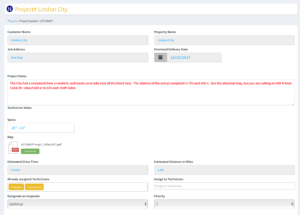
Once the Project is sent to Operations, this what the NTE project looks like for Operations:
Assign Technicians in the regular way and send the Project to their iPads. As the Technician Cuts the hazards in the area, that data is entered in to BidBoss on the Production side. When they are done for the day, they select Complete and send the BidBoss data to Operations for uploading to the Terminal. In the next version of the Terminal, this process will be automated. When you have received the BidBoss data, select the BB Production Data button on the bottom left of screen. This will allow you to upload the data.
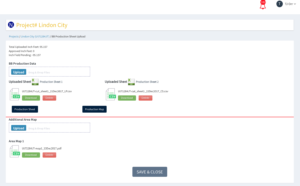
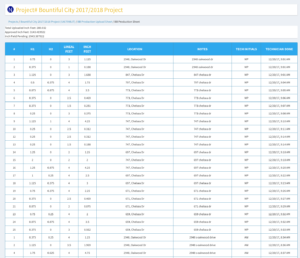
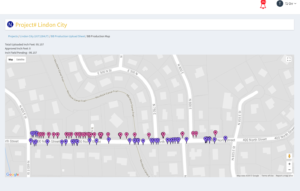
Drag the BidBoss Production spreadsheet into the Upload section. The Spreadsheet is upload and labeled with the Project Number, Date and the Initials of the Technician. Selecting Production Sheet will bring up a Cut Sheet. The Cut Sheet will show Total Uploaded Inch Feet, Approved Inch Feet and Remaining Inch Feet to be cut. Selecting Production Map will show a Google Map with Pins of the Hazards that have been Cut.
Occasionally the Salesperson will receive additional maps from the Client for new Areas. These Maps will be uploaded by the SalesPerson and shown in the Area Map Section. These Maps will automatically be shown to Operations and all assigned Technicians.